
 Household, Living & Cooking
 Outdoor, Travel & Sports
 DIY, Garden & Animals
 Fashion accessories & Shoes
 Car & Motor
 Computer & Electronics
 Office & School
 Beautiful & Healthy
 Toys
Toys Eat Drink
 Baby
Baby Christmas
 King's Day


 8
8Office Chairs for Working from Home, Studying and Daily Office Use
Buy office chairs for home, study and work
An office chair may be used for several hours each day. Its dimensions, support and adjustment options are therefore more important than its color or general shape. At Discountershop, you can compare office chairs for working from home, studying, administrative tasks and daily office use.
A height-adjustable office chair provides the starting point for many workstations. Depending on how long the chair will be used, you may also need an adjustable backrest, lumbar support, headrest, tilt function or adjustable armrests. The base, wheels and maximum weight capacity should also suit the user and the flooring.
Before ordering, check:
- seat height and seat depth;
- height and shape of the backrest;
- lower-back support;
- armrest adjustment;
- presence of a headrest;
- type of tilt or movement mechanism;
- maximum weight capacity;
- seat and backrest materials;
- wheel type;
- overall chair dimensions.
Which office chair suits your workspace?
The right choice depends on how long you sit, the work you perform and the space available around the desk. A compact office chair without armrests can work well at a small workstation. For longer working days, an adjustable office chair with back support and armrests may provide more ways to adapt the chair to the user.
Common options include:
- Ergonomic office chairs: offer several adjustments to match the chair more closely to the user and desk.
- Office chairs with armrests: provide support for the forearms while typing, reading or using a computer.
- Office chairs without armrests: usually require less space and can often slide farther beneath a desk.
- Office chairs with headrests: support the head or neck when the user leans backward.
- Mesh office chairs: have an open backrest that allows air to move more freely.
- Upholstered office chairs: have fabric-covered seats and may also include padded backrests.
- Faux leather office chairs: have a smooth surface that is generally easy to wipe clean.
- Compact office chairs: fit smaller home offices, study areas or desk corners.
- Swivel office chairs with wheels: allow the user to rotate and move short distances around the desk.
Not every chair described as ergonomic includes the same adjustments. Review the product specifications to see which components can actually be changed.
How to set the correct seat height
Seat height affects the position of your feet, legs and arms in relation to the desk. Adjust the chair so both feet rest securely on the floor. The thighs should be supported without the front edge of the seat pressing firmly against the backs of the knees.
Next, check the desk height. When the desktop is too high, the shoulders may lift while typing. If the chair must be raised to compensate, a footrest may be needed when the feet can no longer reach the floor comfortably.
When comparing a height-adjustable office chair, check:
- minimum seat height;
- maximum seat height;
- desk height;
- user height;
- space beneath the desktop;
- position of drawers or support beams;
- armrest height.
The correct setting differs between users. A chair that fits one person may be too high, low or deep for somebody with different proportions.
Why seat depth matters
Seat depth is the distance between the front of the seat and the backrest. A seat that is too deep may make it difficult to sit against the backrest without feeling pressure behind the knees. A very short seat may provide less support beneath the thighs.
An office chair with adjustable seat depth allows the seat to move forward or backward. This helps adapt the space between the seat edge and the backs of the knees.
Review:
- total seat depth;
- usable seat depth;
- seat-depth adjustment range;
- shape of the front seat edge;
- amount and firmness of the padding.
A rounded front edge may reduce pressure beneath the thighs, but the fit still depends on the user’s proportions and the chair settings.
Office chairs with lumbar support
Lumbar support is positioned around the lower back. It may be built into the shape of the backrest or provided as a separately adjustable component.
Common types include:
- a fixed curve in the backrest;
- height-adjustable lumbar support;
- depth-adjustable lumbar support;
- a separate lower-back cushion;
- a flexible mesh backrest that moves partially with the user.
A fixed lumbar curve cannot be repositioned, so its shape must suit the user. An adjustable support can be placed more accurately against the lower back.
The support should make contact without pressing firmly or forcing the spine into an uncomfortable position.
High-back and low-back office chairs
A high-back office chair supports a larger area of the back. Some models also include a headrest. This type can be useful for users who lean back regularly or spend extended periods at the desk.
A lower backrest may be sufficient for shorter tasks or compact workspaces. These chairs generally occupy less visual and physical space, but they do not support the upper back or head.
Compare:
- backrest height;
- backrest width;
- shape around the shoulders;
- position of the lumbar support;
- backrest-angle adjustment;
- presence of a headrest or neck support.
A high backrest is not automatically the better option. The dimensions and adjustments still need to match the user.
Office chairs with headrests
A headrest mainly provides support when the user leans backward. During active typing, the head does not need to remain against the support.
An adjustable headrest may offer changes in height, angle or depth. Check whether it can be positioned behind the head or around the transition between the neck and upper back.
Consider:
- height adjustment;
- angle adjustment;
- width of the support;
- amount of padding;
- connection to the backrest;
- space required behind the chair.
An office chair with a headrest is usually taller than a standard chair. Measure the available space beneath shelves, cabinets or sloping ceilings.
Adjustable armrests
Armrests can support the forearms and help prevent the shoulders from remaining raised. However, they should not stop the chair from moving close enough to the desk.
Armrests may adjust in several ways:
- height only;
- height and width;
- forward and backward;
- inward or outward rotation;
- fully folding upward.
Check whether the armrests fit beneath the desk. Fixed armrests may be too high for the chair to slide completely under the desktop. Folding armrests can be useful at a small workstation or when you want to switch between supported and unsupported sitting.
Set the armrests so the forearms receive light support while the shoulders remain relaxed. The full weight of the arms does not need to rest on them while typing.
Tilt functions and synchronous mechanisms
An office chair with a tilt function can move backward. On basic chairs, the seat and backrest may tilt together as one unit. Other chairs use a mechanism in which the seat and backrest move at different angles.
Common systems include:
- Fixed backrest: the backrest angle does not change.
- Tilt mechanism: the entire seat and backrest tilt backward.
- Adjustable backrest angle: the backrest can be locked in a chosen position.
- Synchronous mechanism: the seat and backrest move together at different ratios.
- Free-movement setting: the chair follows some of the user’s movement.
Check whether the resistance can be adjusted according to body weight. When the resistance is too low, the chair may move backward very easily. When it is too high, reclining requires greater force.
A movement mechanism supports changes in position, but it does not replace regular standing, walking and changes in posture.
Mesh, fabric or faux leather
The material affects temperature, cleaning and contact with the chair.
Mesh office chairs
A mesh office chair has an open woven backrest and may also include a mesh seat. The material allows airflow and can adapt partially to the user’s shape. Check how tightly the mesh is tensioned and whether the chair includes sufficient lower-back support.
Fabric office chairs
Fabric usually provides a less slippery sitting surface. The weave and padding vary between products. Dust, crumbs and liquids may require more attention than they would on a smooth cover.
Faux leather office chairs
Faux leather has a smooth surface that can generally be wiped with a suitable cloth. Heat, direct sunlight and unsuitable cleaning products may affect the covering over time. Always check the care instructions.
For each material, consider:
- stain sensitivity;
- cleaning requirements;
- airflow;
- seat firmness;
- wear around seams and edges;
- contact with clothing and pets.
Office chair wheels for hard floors and carpets
Office chair wheels should suit the flooring. Some wheels are intended mainly for carpet, while softer alternatives may be better suited to wood, laminate or tile.
A suitable floor mat can also be used on hard flooring. It helps reduce scratches, dirt and wear around the workstation.
Check:
- which flooring the wheels are intended for;
- wheel diameter;
- whether the wheels lock when the chair is not occupied;
- whether hair and dirt can be removed;
- availability of replacement wheels.
A worn or blocked wheel may prevent the chair from moving evenly. Remove collected hair and debris regularly and check that every wheel rotates freely.
Choosing an office chair for working from home
A home office chair should suit the available space and the number of hours the workstation is used. Someone who occasionally works on a laptop may have different requirements from a person who works full days from home.
Important considerations include:
- sufficient seat-height adjustment;
- a backrest that suits the user;
- armrests that fit beneath the desk;
- wheels suitable for the floor;
- dimensions that fit the room;
- enough space for the chair to rotate;
- upholstery suited to the room temperature and cleaning needs.
When working at a dining table, check whether the chair can move close enough to the tabletop. Wide armrests or a large five-star base may not fit between the table legs.
Office chairs for small workspaces
In a smaller room, the complete size of the chair becomes especially important. Do not only measure the seat. Account for the base, armrests and space required for rotation.
A compact office chair may include:
- a narrower seat;
- a lower backrest;
- folding armrests;
- a smaller base;
- reduced overall depth;
- no separate headrest.
There must still be enough room to sit down, stand up and move backward safely. A small chair is not suitable when the seat or backrest does not fit the user.
Office chairs for taller or heavier users
Body height and weight influence the required dimensions and construction. A taller user may need greater seat depth, a higher backrest and a wider adjustment range. For a heavier user, the maximum weight capacity is especially important.
Check:
- stated maximum weight capacity;
- minimum and maximum seat height;
- usable seat width;
- seat depth;
- backrest height;
- width between the armrests;
- base construction;
- movement-mechanism range.
Do not exceed the stated weight limit. Inspect the base, gas lift, wheels and fixing points regularly.
Comparing affordable office chairs
An affordable office chair can be suitable for studying, occasional home working or a basic workstation. Price should not be the only point of comparison. A chair with limited adjustment may not suit multiple users or several hours of daily use.
When comparing budget office chairs, review:
- which components are adjustable;
- seat-height range;
- maximum weight capacity;
- seat and backrest materials;
- type of movement mechanism;
- whether armrests are included;
- warranty and assembly information;
- availability of replacement components.
A chair that fits the user and workstation is more practical than a cheaper model that cannot be adjusted correctly.
Ordering office chairs online
When buying an office chair online, product measurements and specifications are particularly important. Photographs do not always show the usable seat depth, full base width or adjustment range.
Check at least:
- overall height, width and depth;
- minimum and maximum seat height;
- seat width and seat depth;
- backrest height;
- armrest height;
- maximum weight capacity;
- seat and backrest materials;
- type of movement mechanism;
- wheel type;
- assembly requirements.
Measure the desk height and the free space beneath it. Also check how much floor area is available and whether the chair can rotate without touching walls or furniture.
Compare office chairs at Discountershop by dimensions, adjustments, back support, armrests and upholstery. This helps you select a work chair that suits the user, workstation and expected daily use.
Frequently Asked Questions About Office Chairs
How should you adjust an office chair?
Start with the seat height. Place both feet securely on the floor and make sure the thighs are supported. Sit against the backrest and position any lumbar support around the lower back. Adjust the armrests so the shoulders remain relaxed. Finally, set the backrest angle and movement resistance according to your body weight and preferred working position.
What is the correct office chair height?
The correct seat height depends on the user’s height, leg length and desk height. The feet should reach the floor or a suitable footrest. The knees should remain in a relaxed position, and the thighs should be supported without strong pressure behind the knees. The forearms should also be able to remain near desktop height while working.
Why is adjustable seat depth important?
Adjustable seat depth helps match the chair to the length of the user’s thighs. A seat that is too deep may press behind the knees or make it difficult to sit against the backrest. A seat that is too short provides less thigh support. A suitable setting leaves some space between the front seat edge and the backs of the knees.
What does lumbar support do?
Lumbar support makes contact with the curved area of the lower back. It may be fixed within the backrest or adjustable in height and depth. Position it so the back remains in contact with the backrest without feeling concentrated pressure. The correct position depends on the user and chair design.
Are armrests necessary on an office chair?
Armrests are not essential, but they can support the forearms and help the shoulders remain relaxed. They should be positioned correctly and must not prevent the chair from moving close to the desk. Folding armrests or a chair without armrests may be more practical in a small workspace.
What is the difference between a tilt and synchronous mechanism?
With a basic tilt mechanism, the seat and backrest generally move backward together. With a synchronous mechanism, the seat and backrest move at different but connected angles. This increases the angle between the torso and thighs while reclining. The exact movement and adjustment options vary between chairs.
Is an office chair with a headrest better?
A headrest can be useful when you regularly lean backward. The head does not need to remain against it during active typing. Whether it is suitable depends on the user’s height and the headrest’s adjustment range. A poorly positioned support may press uncomfortably against the neck or back of the head.
Is a mesh office chair suitable for long working days?
A mesh backrest can allow airflow and adapt partly to the user’s body. Whether the chair is suitable for long working days also depends on its seat depth, lumbar support, armrests, height adjustment and movement mechanism. Mesh upholstery alone does not make an office chair suitable for extended use.
Which office chair is suitable for a small room?
Look at the chair’s full width, depth and turning circle. A model with a compact base, lower backrest and folding armrests may require less room. The seat and backrest must still fit the user. Leave enough space to roll backward and stand up safely.
Which office chair wheels do I need?
The correct wheel type depends on the floor. Wheels designed for carpets may differ from those intended for wood, laminate or tile. Check the product specifications and consider using a suitable floor mat. Remove hair and dirt from the wheels regularly so the chair continues to roll evenly.
How often should you change your sitting position?
No single sitting position should be maintained throughout the entire working day. Change your position regularly, use the chair’s movement function, and alternate between sitting, standing and walking where possible. An office chair should support movement rather than hold the user in one fixed position.
How do you maintain an office chair?
Remove dust and dirt regularly from the upholstery, backrest and wheels. Inspect screws, armrests, the base and moving components periodically. Use cleaning products that are suitable for the material. Stop using the chair when the gas lift, backrest, wheels or load-bearing connections are visibly damaged.
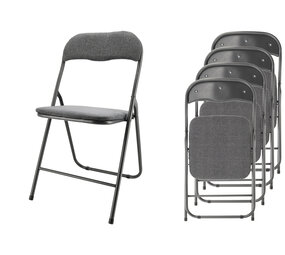
The chairs can hold up to 100 kg, ...
The chairs can hold up ...
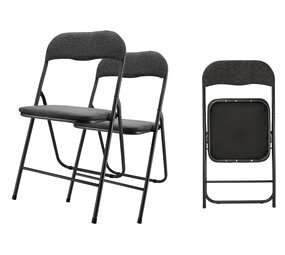
The chairs are made of durable mat...
The chairs are made of ...
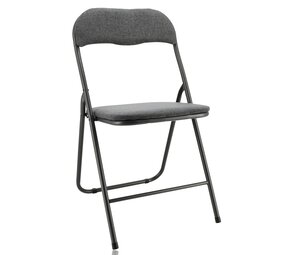
This practical chair combines func...
This practical chair co...
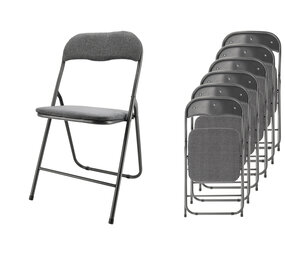
The Folding Chair Premium set of 6...
The Folding Chair Premi...
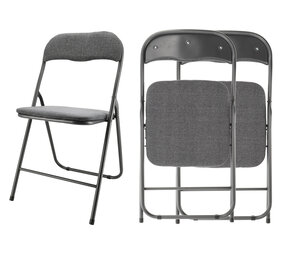
The chairs are made of sturdy mate...
The chairs are made of ...
Overige categorieën in Household, Living & Cooking
Office Chairs for Working from Home, Studying and Daily Office Use
Buy office chairs for home, study and work
An office chair may be used for several hours each day. Its dimensions, support and adjustment options are therefore more important than its color or general shape. At Discountershop, you can compare office chairs for working from home, studying, administrative tasks and daily office use.
A height-adjustable office chair provides the starting point for many workstations. Depending on how long the chair will be used, you may also need an adjustable backrest, lumbar support, headrest, tilt function or adjustable armrests. The base, wheels and maximum weight capacity should also suit the user and the flooring.
Before ordering, check:
- seat height and seat depth;
- height and shape of the backrest;
- lower-back support;
- armrest adjustment;
- presence of a headrest;
- type of tilt or movement mechanism;
- maximum weight capacity;
- seat and backrest materials;
- wheel type;
- overall chair dimensions.
Which office chair suits your workspace?
The right choice depends on how long you sit, the work you perform and the space available around the desk. A compact office chair without armrests can work well at a small workstation. For longer working days, an adjustable office chair with back support and armrests may provide more ways to adapt the chair to the user.
Common options include:
- Ergonomic office chairs: offer several adjustments to match the chair more closely to the user and desk.
- Office chairs with armrests: provide support for the forearms while typing, reading or using a computer.
- Office chairs without armrests: usually require less space and can often slide farther beneath a desk.
- Office chairs with headrests: support the head or neck when the user leans backward.
- Mesh office chairs: have an open backrest that allows air to move more freely.
- Upholstered office chairs: have fabric-covered seats and may also include padded backrests.
- Faux leather office chairs: have a smooth surface that is generally easy to wipe clean.
- Compact office chairs: fit smaller home offices, study areas or desk corners.
- Swivel office chairs with wheels: allow the user to rotate and move short distances around the desk.
Not every chair described as ergonomic includes the same adjustments. Review the product specifications to see which components can actually be changed.
How to set the correct seat height
Seat height affects the position of your feet, legs and arms in relation to the desk. Adjust the chair so both feet rest securely on the floor. The thighs should be supported without the front edge of the seat pressing firmly against the backs of the knees.
Next, check the desk height. When the desktop is too high, the shoulders may lift while typing. If the chair must be raised to compensate, a footrest may be needed when the feet can no longer reach the floor comfortably.
When comparing a height-adjustable office chair, check:
- minimum seat height;
- maximum seat height;
- desk height;
- user height;
- space beneath the desktop;
- position of drawers or support beams;
- armrest height.
The correct setting differs between users. A chair that fits one person may be too high, low or deep for somebody with different proportions.
Why seat depth matters
Seat depth is the distance between the front of the seat and the backrest. A seat that is too deep may make it difficult to sit against the backrest without feeling pressure behind the knees. A very short seat may provide less support beneath the thighs.
An office chair with adjustable seat depth allows the seat to move forward or backward. This helps adapt the space between the seat edge and the backs of the knees.
Review:
- total seat depth;
- usable seat depth;
- seat-depth adjustment range;
- shape of the front seat edge;
- amount and firmness of the padding.
A rounded front edge may reduce pressure beneath the thighs, but the fit still depends on the user’s proportions and the chair settings.
Office chairs with lumbar support
Lumbar support is positioned around the lower back. It may be built into the shape of the backrest or provided as a separately adjustable component.
Common types include:
- a fixed curve in the backrest;
- height-adjustable lumbar support;
- depth-adjustable lumbar support;
- a separate lower-back cushion;
- a flexible mesh backrest that moves partially with the user.
A fixed lumbar curve cannot be repositioned, so its shape must suit the user. An adjustable support can be placed more accurately against the lower back.
The support should make contact without pressing firmly or forcing the spine into an uncomfortable position.
High-back and low-back office chairs
A high-back office chair supports a larger area of the back. Some models also include a headrest. This type can be useful for users who lean back regularly or spend extended periods at the desk.
A lower backrest may be sufficient for shorter tasks or compact workspaces. These chairs generally occupy less visual and physical space, but they do not support the upper back or head.
Compare:
- backrest height;
- backrest width;
- shape around the shoulders;
- position of the lumbar support;
- backrest-angle adjustment;
- presence of a headrest or neck support.
A high backrest is not automatically the better option. The dimensions and adjustments still need to match the user.
Office chairs with headrests
A headrest mainly provides support when the user leans backward. During active typing, the head does not need to remain against the support.
An adjustable headrest may offer changes in height, angle or depth. Check whether it can be positioned behind the head or around the transition between the neck and upper back.
Consider:
- height adjustment;
- angle adjustment;
- width of the support;
- amount of padding;
- connection to the backrest;
- space required behind the chair.
An office chair with a headrest is usually taller than a standard chair. Measure the available space beneath shelves, cabinets or sloping ceilings.
Adjustable armrests
Armrests can support the forearms and help prevent the shoulders from remaining raised. However, they should not stop the chair from moving close enough to the desk.
Armrests may adjust in several ways:
- height only;
- height and width;
- forward and backward;
- inward or outward rotation;
- fully folding upward.
Check whether the armrests fit beneath the desk. Fixed armrests may be too high for the chair to slide completely under the desktop. Folding armrests can be useful at a small workstation or when you want to switch between supported and unsupported sitting.
Set the armrests so the forearms receive light support while the shoulders remain relaxed. The full weight of the arms does not need to rest on them while typing.
Tilt functions and synchronous mechanisms
An office chair with a tilt function can move backward. On basic chairs, the seat and backrest may tilt together as one unit. Other chairs use a mechanism in which the seat and backrest move at different angles.
Common systems include:
- Fixed backrest: the backrest angle does not change.
- Tilt mechanism: the entire seat and backrest tilt backward.
- Adjustable backrest angle: the backrest can be locked in a chosen position.
- Synchronous mechanism: the seat and backrest move together at different ratios.
- Free-movement setting: the chair follows some of the user’s movement.
Check whether the resistance can be adjusted according to body weight. When the resistance is too low, the chair may move backward very easily. When it is too high, reclining requires greater force.
A movement mechanism supports changes in position, but it does not replace regular standing, walking and changes in posture.
Mesh, fabric or faux leather
The material affects temperature, cleaning and contact with the chair.
Mesh office chairs
A mesh office chair has an open woven backrest and may also include a mesh seat. The material allows airflow and can adapt partially to the user’s shape. Check how tightly the mesh is tensioned and whether the chair includes sufficient lower-back support.
Fabric office chairs
Fabric usually provides a less slippery sitting surface. The weave and padding vary between products. Dust, crumbs and liquids may require more attention than they would on a smooth cover.
Faux leather office chairs
Faux leather has a smooth surface that can generally be wiped with a suitable cloth. Heat, direct sunlight and unsuitable cleaning products may affect the covering over time. Always check the care instructions.
For each material, consider:
- stain sensitivity;
- cleaning requirements;
- airflow;
- seat firmness;
- wear around seams and edges;
- contact with clothing and pets.
Office chair wheels for hard floors and carpets
Office chair wheels should suit the flooring. Some wheels are intended mainly for carpet, while softer alternatives may be better suited to wood, laminate or tile.
A suitable floor mat can also be used on hard flooring. It helps reduce scratches, dirt and wear around the workstation.
Check:
- which flooring the wheels are intended for;
- wheel diameter;
- whether the wheels lock when the chair is not occupied;
- whether hair and dirt can be removed;
- availability of replacement wheels.
A worn or blocked wheel may prevent the chair from moving evenly. Remove collected hair and debris regularly and check that every wheel rotates freely.
Choosing an office chair for working from home
A home office chair should suit the available space and the number of hours the workstation is used. Someone who occasionally works on a laptop may have different requirements from a person who works full days from home.
Important considerations include:
- sufficient seat-height adjustment;
- a backrest that suits the user;
- armrests that fit beneath the desk;
- wheels suitable for the floor;
- dimensions that fit the room;
- enough space for the chair to rotate;
- upholstery suited to the room temperature and cleaning needs.
When working at a dining table, check whether the chair can move close enough to the tabletop. Wide armrests or a large five-star base may not fit between the table legs.
Office chairs for small workspaces
In a smaller room, the complete size of the chair becomes especially important. Do not only measure the seat. Account for the base, armrests and space required for rotation.
A compact office chair may include:
- a narrower seat;
- a lower backrest;
- folding armrests;
- a smaller base;
- reduced overall depth;
- no separate headrest.
There must still be enough room to sit down, stand up and move backward safely. A small chair is not suitable when the seat or backrest does not fit the user.
Office chairs for taller or heavier users
Body height and weight influence the required dimensions and construction. A taller user may need greater seat depth, a higher backrest and a wider adjustment range. For a heavier user, the maximum weight capacity is especially important.
Check:
- stated maximum weight capacity;
- minimum and maximum seat height;
- usable seat width;
- seat depth;
- backrest height;
- width between the armrests;
- base construction;
- movement-mechanism range.
Do not exceed the stated weight limit. Inspect the base, gas lift, wheels and fixing points regularly.
Comparing affordable office chairs
An affordable office chair can be suitable for studying, occasional home working or a basic workstation. Price should not be the only point of comparison. A chair with limited adjustment may not suit multiple users or several hours of daily use.
When comparing budget office chairs, review:
- which components are adjustable;
- seat-height range;
- maximum weight capacity;
- seat and backrest materials;
- type of movement mechanism;
- whether armrests are included;
- warranty and assembly information;
- availability of replacement components.
A chair that fits the user and workstation is more practical than a cheaper model that cannot be adjusted correctly.
Ordering office chairs online
When buying an office chair online, product measurements and specifications are particularly important. Photographs do not always show the usable seat depth, full base width or adjustment range.
Check at least:
- overall height, width and depth;
- minimum and maximum seat height;
- seat width and seat depth;
- backrest height;
- armrest height;
- maximum weight capacity;
- seat and backrest materials;
- type of movement mechanism;
- wheel type;
- assembly requirements.
Measure the desk height and the free space beneath it. Also check how much floor area is available and whether the chair can rotate without touching walls or furniture.
Compare office chairs at Discountershop by dimensions, adjustments, back support, armrests and upholstery. This helps you select a work chair that suits the user, workstation and expected daily use.
Frequently Asked Questions About Office Chairs
How should you adjust an office chair?
Start with the seat height. Place both feet securely on the floor and make sure the thighs are supported. Sit against the backrest and position any lumbar support around the lower back. Adjust the armrests so the shoulders remain relaxed. Finally, set the backrest angle and movement resistance according to your body weight and preferred working position.
What is the correct office chair height?
The correct seat height depends on the user’s height, leg length and desk height. The feet should reach the floor or a suitable footrest. The knees should remain in a relaxed position, and the thighs should be supported without strong pressure behind the knees. The forearms should also be able to remain near desktop height while working.
Why is adjustable seat depth important?
Adjustable seat depth helps match the chair to the length of the user’s thighs. A seat that is too deep may press behind the knees or make it difficult to sit against the backrest. A seat that is too short provides less thigh support. A suitable setting leaves some space between the front seat edge and the backs of the knees.
What does lumbar support do?
Lumbar support makes contact with the curved area of the lower back. It may be fixed within the backrest or adjustable in height and depth. Position it so the back remains in contact with the backrest without feeling concentrated pressure. The correct position depends on the user and chair design.
Are armrests necessary on an office chair?
Armrests are not essential, but they can support the forearms and help the shoulders remain relaxed. They should be positioned correctly and must not prevent the chair from moving close to the desk. Folding armrests or a chair without armrests may be more practical in a small workspace.
What is the difference between a tilt and synchronous mechanism?
With a basic tilt mechanism, the seat and backrest generally move backward together. With a synchronous mechanism, the seat and backrest move at different but connected angles. This increases the angle between the torso and thighs while reclining. The exact movement and adjustment options vary between chairs.
Is an office chair with a headrest better?
A headrest can be useful when you regularly lean backward. The head does not need to remain against it during active typing. Whether it is suitable depends on the user’s height and the headrest’s adjustment range. A poorly positioned support may press uncomfortably against the neck or back of the head.
Is a mesh office chair suitable for long working days?
A mesh backrest can allow airflow and adapt partly to the user’s body. Whether the chair is suitable for long working days also depends on its seat depth, lumbar support, armrests, height adjustment and movement mechanism. Mesh upholstery alone does not make an office chair suitable for extended use.
Which office chair is suitable for a small room?
Look at the chair’s full width, depth and turning circle. A model with a compact base, lower backrest and folding armrests may require less room. The seat and backrest must still fit the user. Leave enough space to roll backward and stand up safely.
Which office chair wheels do I need?
The correct wheel type depends on the floor. Wheels designed for carpets may differ from those intended for wood, laminate or tile. Check the product specifications and consider using a suitable floor mat. Remove hair and dirt from the wheels regularly so the chair continues to roll evenly.
How often should you change your sitting position?
No single sitting position should be maintained throughout the entire working day. Change your position regularly, use the chair’s movement function, and alternate between sitting, standing and walking where possible. An office chair should support movement rather than hold the user in one fixed position.
How do you maintain an office chair?
Remove dust and dirt regularly from the upholstery, backrest and wheels. Inspect screws, armrests, the base and moving components periodically. Use cleaning products that are suitable for the material. Stop using the chair when the gas lift, backrest, wheels or load-bearing connections are visibly damaged.
